

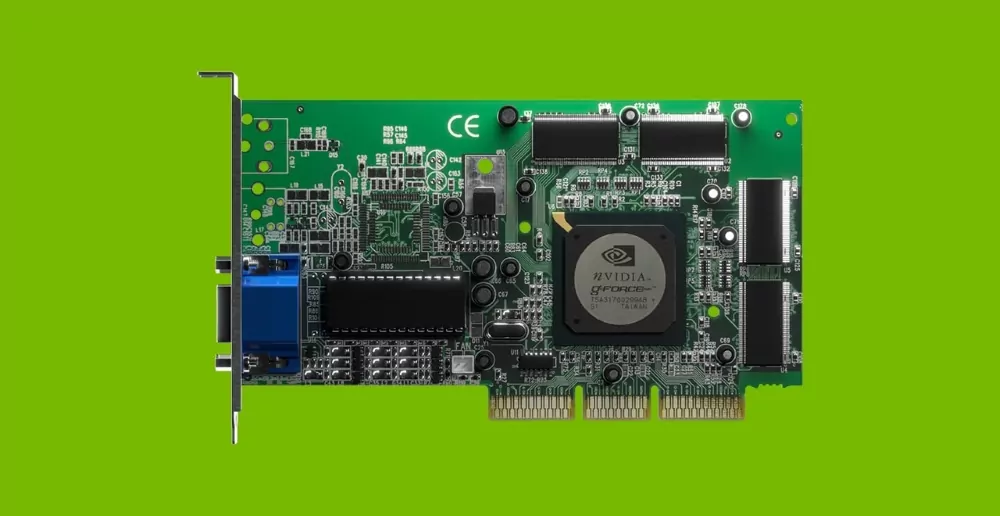
An AI accelerator is a specialized processor built for machine learning and deep learning workloads. Unlike a general-purpose CPU, it is optimized for the calculations behind neural networks, including matrix multiplication, tensor operations, and parallel data processing.
Standard CPUs can run AI workloads, but they are often slower and less energy-efficient. As AI models became larger and more widely deployed, businesses needed hardware that could train models faster, run inference with lower latency, and use less power.
AI accelerators are especially important in two environments:
- Edge devices need fast AI decisions without draining battery life.
- Cloud systems need massive compute capacity for training and large-scale inference.
- Real-time applications need low latency for tasks such as vision, speech, and autonomous control.
- Commercial products need efficient hardware to control infrastructure and operating costs.
Different accelerators serve different needs. NPUs are common in smartphones, cameras, and compact edge devices. GPUs are widely used in data centers for training and high-performance AI workloads. TPUs, ASICs, FPGAs, and wafer-scale processors support more specialized use cases.

The right accelerator depends on the model, workload, power limits, deployment environment, and long-term product roadmap. For AI products, hardware choice can directly affect speed, cost, scalability, and reliability.
Benefits of AI Accelerators in Modern Computing
AI accelerators do more than increase speed. They improve the full AI workflow, from model development to real-world deployment.
Their main advantage is faster training and inference. Machine learning teams can test models more quickly, while users get faster responses from AI-powered products. This matters for applications such as computer vision, speech recognition, industrial control, and medical imaging.
AI accelerators also improve energy efficiency. They are designed to perform more AI operations per watt than general-purpose CPUs. For data centers, this can reduce power and cooling pressure. For edge devices, it can extend battery life and reduce the need for bulky thermal systems.
Key benefits include:
- Faster model training can shorten development cycles.
- Lower inference latency can improve product responsiveness.
- Better energy efficiency can reduce operating costs.
- Higher compute density can support larger AI workloads in limited space.
- Specialized hardware can make new AI features practical at scale.

There is no single best AI accelerator for every product. GPUs are strong for complex model training and parallel workloads. TPUs and NPUs are often efficient for inference. FPGAs offer flexibility for custom workloads, while ASICs can deliver high efficiency when the use case is stable and high volume.
For founders and CTOs, choosing an AI accelerator is both a technical and business decision. The wrong chip can increase cost, power use, and integration complexity. The right one can improve product performance, reduce infrastructure spend, and support faster market entry.
At AJProTech, we help companies evaluate AI accelerator options and integrate the right hardware for their product goals, whether they are building edge AI devices or scaling cloud-based AI infrastructure.
Types of AI Chips and Accelerator Architectures
AI workloads have outgrown what general-purpose CPUs can handle efficiently. Modern machine learning and deep learning systems need specialized hardware that can process large models faster, reduce latency, and improve energy efficiency.
Different AI accelerators serve different deployment goals. Some are built for massive cloud training, while others are optimized for compact edge devices, low power use, or custom workloads.
| AI chip type | Best for | Key advantages | Main limitations |
| GPU | AI training, generative AI, computer vision, and large parallel workloads. | GPUs offer strong compute power, broad software support, and access to mature AI libraries. | They can consume significant power and may be inefficient for small edge devices. |
| TPU | Large-scale tensor operations, cloud AI training, and inference. | TPUs deliver high throughput for neural network workloads and strong performance per watt in supported environments. | They are less flexible than GPUs and are usually tied to cloud-based deployment. |
| NPU | Mobile devices, embedded systems, cameras, and edge AI products. | NPUs provide fast local inference with low power use and compact hardware requirements. | They may not support every model type or complex training workload. |
| FPGA | Telecom, aerospace, factory automation, and changing AI workloads. | FPGAs can be reprogrammed after deployment and optimized for low-latency inference. | They require more engineering effort and a less accessible software stack. |
| ASIC | High-volume, stable, and specialized AI workloads. | ASICs offer excellent efficiency, low latency, and strong performance for a defined task. | They are expensive to design and difficult to modify after production. |
| Wafer-scale processor | Very large AI models, high-performance training, and data center workloads. | Wafer-scale systems provide extreme compute density and are built for massive AI tasks. | They are costly, specialized, and unsuitable for most edge or embedded products. |
For most startups, GPUs are often the fastest way to train and test AI models. NPUs are usually better for edge products that need low power use and real-time inference. FPGAs can be useful when the workload may change after deployment. ASICs make sense when the product is stable, high volume, and cost-sensitive at scale.
The right choice depends on several practical factors:
- The workload must match the chip’s strengths.
- The hardware must fit the product’s power and cooling limits.
- The software stack must support the target AI model.
- The deployment plan must account for cost, updates, and long-term availability.
- The architecture should support both current performance needs and future product changes.
Comparing Edge AI and Cloud AI Chips
Choosing between edge and cloud AI deployment goes beyond physical location: it shapes how your business operates.
Cloud AI chips, housed in powerful data centers, offer massive computing resources and robust software support. They’re perfect for vast datasets and large-scale model training. This domain is home to high-powered GPUs, TPUs, and even wafer-scale ASICs, where space, cooling, and continuous electricity are not concerns.
Edge AI chips, conversely, embed intelligence directly into devices operating in the field without relying on a remote server. These chips handle incoming data instantly, while keeping energy use and latency to a minimum. Examples include security cameras analyzing live video or medical wearables providing real-time feedback.
Key factors that guide the decision include:
- Latency: Applications requiring rapid responses benefit from edge deployment, where milliseconds can matter for safety or experience.
- Power budget: Battery-powered devices need chips optimized for energy efficiency, such as NPUs and compact FPGAs.
- Data privacy and scale: Keeping sensitive data local ensures privacy and security, necessary in healthcare and finance.
- Cost and upgrade cycles: While cloud AI offers easier scaling, edge deployments may lock hardware for years, so future-proofing matters.
We at AJProTech see edge AI opening new opportunities, especially for startups. Local AI processing enables innovation without waiting on slow cloud round-trips: whether in smart retail, instant analytics, or on-device personalization.

Rapid prototyping and faster iteration become possible, making edge accelerators essential for scaling new ideas. To learn more about matching hardware and design to your business case, consider exploring our IoT product development capabilities.
AI Accelerator Use Cases: Industry Leaders and Real-World Examples
Several companies lead the AI accelerator market, each serving a different type of workload.
| Company / platform | Best for | Main strength |
| NVIDIA GPUs | Cloud AI, generative AI, computer vision, and large model training. | Strong compute power and mature CUDA ecosystem. |
| Apple Silicon NPUs | On-device AI in iPhones, iPads, and Macs. | Private, low-latency inference with strong power efficiency. |
| Intel Gaudi | Enterprise and data center AI workloads. | Scalable AI infrastructure for business environments. |
| AMD MI-series GPUs | Data center training and inference. | Competitive performance for parallel AI workloads. |
| Qualcomm Snapdragon AI | Mobile, IoT, and edge AI devices. | Efficient local inference within tight power limits. |
| Cerebras wafer-scale processors | Very large AI models and high-end training. | Extreme compute density for massive workloads. |
Each platform has a clear role. NVIDIA and AMD are strong choices for large-scale training and inference. Apple and Qualcomm focus on efficient on-device AI. Intel targets enterprise data centers, while Cerebras is built for the heaviest AI workloads.
AI Accelerator Use Cases in Business and Startups
AI accelerators can reshape both product performance and business economics. They help companies process data faster, reduce cloud dependence, and deliver AI features closer to the user.
In finance, AI accelerators can analyze fraud patterns in seconds instead of hours. In healthcare, mobile NPUs can support image analysis and patient monitoring at the point of care. In retail, companies can train models in the cloud or on local clusters, then run inference on edge devices for shelf monitoring, price checks, and customer analytics.
Common business use cases include:
- Financial systems can detect fraud and risk patterns faster.
- Healthcare devices can process sensitive data locally.
- Retail systems can monitor shelves, inventory, and customer movement in real time.
- Industrial systems can detect defects, failures, and safety risks on-site.
- Smart cameras can run object detection without sending every frame to the cloud.
- Wearables can trigger alerts immediately while preserving battery life.
For startups, AI accelerators can make advanced products viable with smaller teams and tighter budgets. A smart camera, for example, can use an edge AI processor to detect objects locally with minimal delay. This improves user experience, reduces cloud compute costs, and keeps sensitive video data on the device.